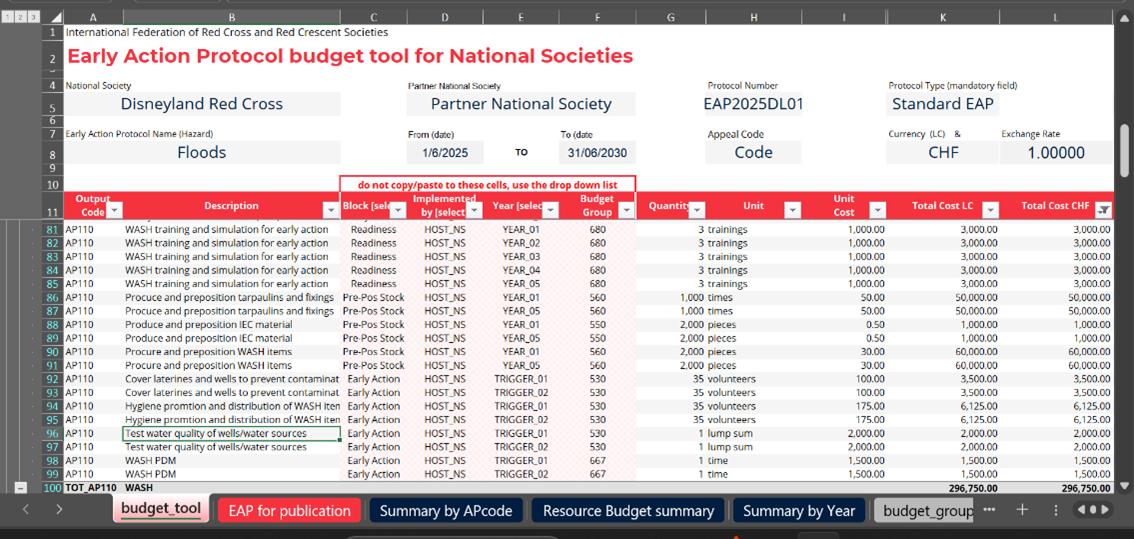
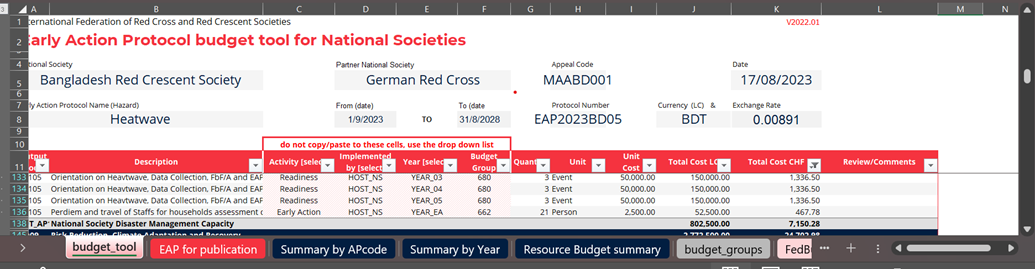
Before you start inputting the budget – make sure you select the protocol type in cell K5 – from the dropdown menu, select either EA Protocol or Simplified EAP. This will automatically set the budget caps and will alert you if the budget cap is overspent.
Now that you have selected the correct template type (cell K5 = EA Protocol or Simplified EAP), read carefully the last tab, ‘guidelines’ for completing the budget template. If you follow the principles here, you will understand how to use the budget template correctly
Budget caps for EAPs and sEAPs:
The maximum budget for a National Society for a full EAP is CHF 900,000. The maximum budget for a National Society for a simplified EAP is CHF 200,000. These figures must be inclusive of the IFRC indirect or programmes and services support recovery (PSSR) of 6.5 per cent.
The IFRC delegation supporting the National Society can add 20,000 for a simplified EAP or CHF 50,000 to support the maintenance and activation of an s/EAP. This sum must include the 6.5 per cent IFRC indirect or programmes and service support recovery (PSSR). The National Society and the IFRC should use the same budget template.
When filling out the budget template, most cells can be copy and paste, except for four columns, where options must be selected manually from the dropdown menu:
- In column C: use the dropdown menu to indicate the type of activity: Readiness, Pre Pos Stock 1 and Pre Pos Stock 2 (only EA Protocol uses Pre Pos Stock 2), and also early action 1 and Early Action 2 (only EA Protocol uses Early Action 2).
- In column D: use the dropdown menu to indicate who will be implementing the activity: Host NS, IFRC or PNS, if a partner has a role in the s/EAP.
- In column E: use the dropdown menu to indicate when the activity will be done:
For readiness, indicate which year the activity will be done (YEAR 1 – YEAR 5 – for an EA Protocol or YEAR 1 – YEAR 2 – for a simplified EAP. If you don’t see these options in the dropdown menu – make sure that you have selected the correct protocol type, cell K5, ‘EA Protocol’ or ‘simplified EAP’). If the activity is done 5 times, you will need to copy this column five times and allocate the five to ‘YEAR 1’, ‘YEAR 2’, through to ‘YEAR 5’. Note, you cannot budget the activity for five years in just one line.
For prepositioned stock, under the simplified EAPs, all stock is always budgeted in ‘YEAR 1’. For a full EAP, stock should be budgeted twice, one allocation in ‘YEAR 1’ and one allocation for the second activation which should be coded to ‘ACTIV_02’. Following the first activation, the second allocation will be transferred, so that the stock can be procured and prepositioned in advance of a second activation.
For early actions, should be budgeted under ‘ACTIV_01’ for the sEAP and for a full EAP, the first activation is budgeted under ‘ACTIV_01’ and ‘ACTIV_02’ for the second activation of a full EAP.
- In column F: indicate using the dropdown menu the appropriate budget group. The full list of budget groups can be found under the excel tab called ‘budget group’.